Showing posts with label repair. Show all posts

Thursday, September 01, 2016

Singer 603E Needle Plate

GEDC0244.JPG

Yesterday, I broke out a really nice 603E that I haven’t used in a long time.  I oiled it up and was running it in and it was humming along perfectly - no rattles, squeaks, or clicks.  At full speed, I moved the stitch width lever over to check out the zig zag without thinking to check whether a zig zag needle plate was installed - it wasn’t!  Not only did the needle break, the straight stitch needle plate also broke.

GEDC0247.JPG

Thinking that the 603 uses the same needle plate as many other slant needle Singers, I grabbed one from another machine sitting nearby.

GEDC0220.JPG

When I started up the 603 again, there was a clicking sound that wasn’t there before.  My first thought was that a piece of the broken needle was somewhere down around the hook but close inspection dispelled that idea.  While looking for the needle fragment, I realized that the clicking sound was not present when the needle plate was removed.  Reinstalling the needle plate brought back the clicking sound.  That indicated to me that the feed dog was probably hitting the underside of the needle plate.  I could not feel any vibration on the plate, the feed dog was just kissing the underside of the plate.

My next thought was that the needle plate I had cannibalized from another machine might be slightly bent so I robbed one from another slant needle machine.  The clicking sound was still present.  My next thought was that perhaps the 600 series machines used a different needle plate than the 400 and 500 series machines, I rummaged through my partial sets of 600 series attachments to find a needle plate that was actually supplied with a 600 series machine. I found one in the box of attachments that came with this machine, probably the only attachment set that has not gotten separated from its machine.  Installing this newly-found needle plate, the clicking sound disappeared and the machine runs as smoothly as before my accident.

Now, here’s the reason I felt this was worth blogging about:  I have three different styles of needle plates for slant needle Singers, all with the same part number - 172200.  While the plates are identical on the top, there are marked differences on the undersides.

GEDC0249.JPG

The only plate that does not interfere with the feed dog is the one on the right.  I am not going to pull off the needle plates on all my slant needle Singers to see which ones have which plate but I will be on the lookout for this in the future.  On second thought, maybe I will pull all the needle plates so I can match up the needle plates with the correct machines but first, I need to figure out whether the plate on the left and the one in the center have any positive or negative effect and which machines perform best with either one.

Ed


Saturday, August 13, 2016

Unusual Singer Featherweight


A friend picked up a Singer Featherweight at an antique shop (first mistake).  The seller told her it had been recently serviced and was good to go.

The first thing I noticed when I flipped on the power switch was that the light did not come on.  There was no light bulb in the socket.

The presser foot installed was a gathering foot.  That is not what you want for straight stitching.  There was no straight stitch foot in the box of attachments.

The installed needle had a burr on the point.

The motor belt was too tight.

There was thread caught in the bobbin case base.

GEDC0228.JPG

There was a considerable amount of lint around the feed dog.

GEDC0226.JPG

The bed cushions are all completely squashed.

GEDC0229.JPG

The gears are in dire need of grease and the rest of the mechanicals need oil.

The good news is that it does sew.  It might need a slight hook-to-needle adjustment, but that is minor.

I have seen hundreds of Featherweights but this one was unusual in one respect - it had a generic motor installed.


I understand why someone would want to do that because replacement motors retail for well over $150 while generic motors can be bought for around $20.  The problem is that Featherweight motors have much different mounting provisions than all other sewing machines, making it impossible to attach a generic motor in place of the original motor.

The previous owner overcame this by designing an adapter plate.


  The motor attaches to the adapter plate and the adapter plate attaches to the Featherweight motor mount.  It is a very simple arrangement, just a flat piece of 1/8" steel plate with two holes to attach the new motor and an anchor nut at the FW motor mounting point

Unfortunately, the motor is mounted so high that the belt would hit the belt guard. 


 Instead of drilling a couple of holes to lower the motor and using a longer belt, the designer added an idler pulley to push the belt down to clear the guard.

I have searched the internet to see if this is a commercial product and have found nothing even similar.  I have a FW with a weak motor, maybe I'll design a similar adapter and install one of my spare motors.

Ed


Tuesday, January 19, 2016

Singer 500a Will Not Form Zig Zag Stitch


To keep all my old sewing machines limber, I like to take them off the shelf occasionally and use them on a project.  I really should tag each machine to tell me when was the last time it was oiled and used but I’m just too lazy.  Anyway, I pulled this Rocketeer off the shelf, oiled it and tested the stitches.  I have no idea how long it had been sitting unused, maybe years.

Straight stitch was fine


but wide zig zag was not. 


I narrowed the stitch width and it got a wee bit better, but still not in the acceptable range.


My first thought was that the needle bar had been shoved up in its clamp by hitting a button or zipper but the marks on the needle bar were in the correct position so I knew that was not the cause.


The next thought was hook timing.  The point of the hook should pass just above the eye of the needle when the lower timing mark on the needle bar is at the needlebar bushing.  It was, so that was not the issue.


When I was watching the hook pass by the needle, I noticed that there seemed to be a more-than-usual separation between the needle and the hook point.  The service manual says that distance should be .018 inches but I measured it at .032 inches – almost twice what it should be.


To be sure that the needlebar was not bent, I installed a size 18 needle and a straight stitch needleplate and checked where the needle passed through the hole in the needleplate.  It looked just like the drawing in the service manual, so the needlebar was not bent.

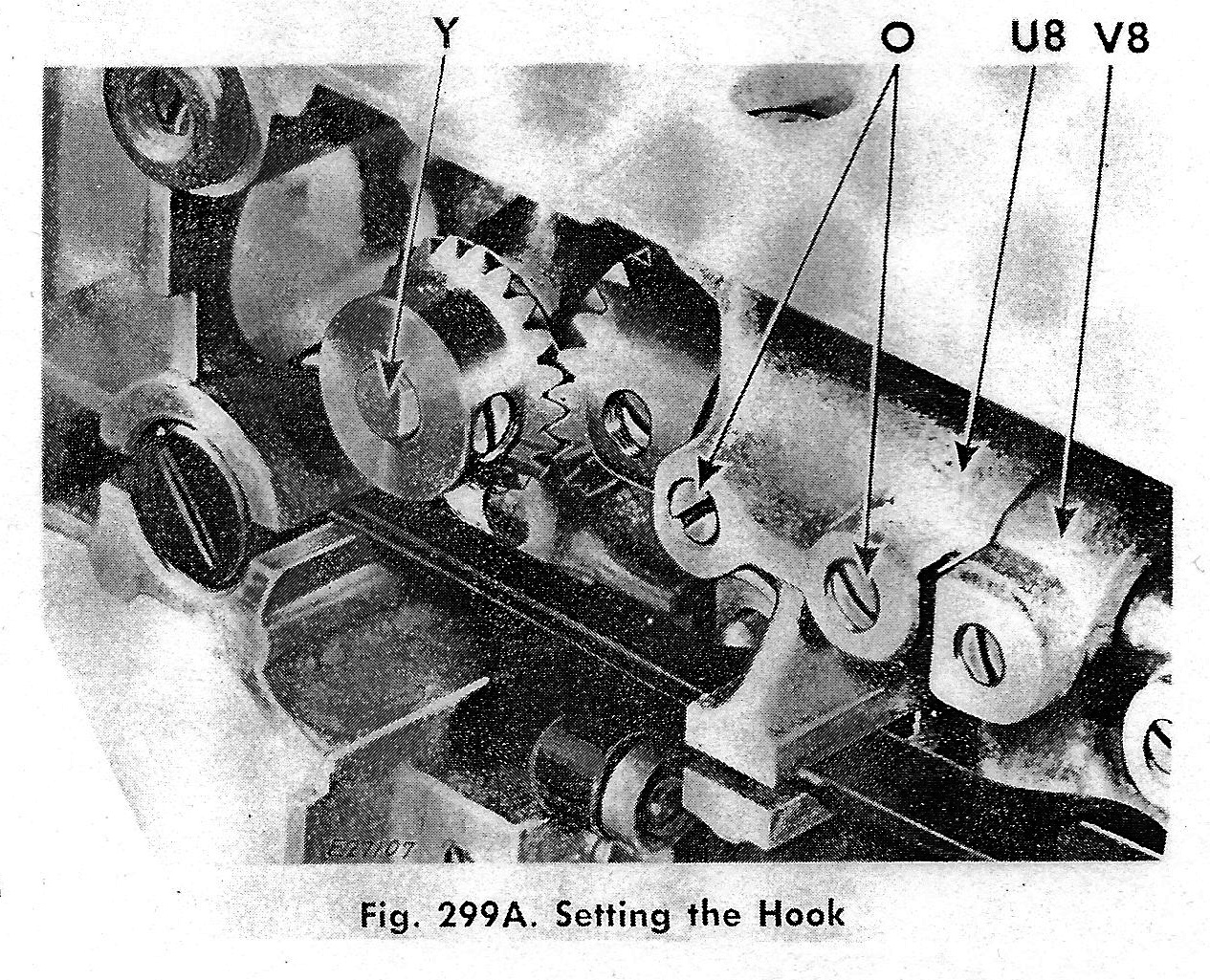
The next step was to move the hook closer to the needle.  The service manual says to loosen the two setscrews indicated by "O"

And move the entire hook saddle.  It was easy enough, after loosening the two screws, the hook saddle swivels around the shaft it is mounted on and the hook point can be moved closer to or farther from the needle.  I moved the hook as close to the needle as possible without hitting it and tightened the screws.

I now still have good straight stitch and the narrow zig zag is as it should be.


I am not getting the full width zig zag that the machine is capable of, but that is a different problem that I will tackle later.

 Ed


Saturday, January 09, 2016

Re-Wiring a Vintage Sewing Machine Foot Control


You bought a new foot control and want to connect it to your current cord; you bought a new cord and need to connect it to your current foot control; you bought a new cord and foot control and they came to you as separate pieces.  The following should help you get that sewing machine running.
I used a vintage Necchi foot control in my example, but you should be able to decode your foot control, once you get it opened up.

Not all vintage foot controls look the same, but all 2-wire controls operate essentially the same – electrical current flows into the control; a resistance of some sort (carbon pile, resistance wire, etc) reduces the size of that current and sends it out to the motor.

1.  Disconnect all electrical power before starting to avoid the possibility of shock or fire!!!
2. Tip the foot control over and locate the screws holding on the bottom cover. 


Many vintage Asian-made foot controls have covers that just slide off, rather than being screwed on.  I won’t discuss modern controllers because there are YouTube videos covering them.  Remove the screws or slide off the bottom cover.  Now is the time to look at any cushions surrounding the screws and obtain replacements for missing or deteriorated cushions.
3. If there is an insulation plate, remove it and set aside.  Not all foot controls have them.


WARNING:  Some controllers contain a capacitor to filter out radio noise.  They usually look like small tin cans.  Capacitors can store electricity, so do not touch the connection points to avoid shock.

4. At this point, look around for pieces that might fall out and get lost.  This controller has a spring that is not attached in any way, some button controllers have an actuating button that can fall out.  Remove any loose pieces, noting where they go so you can get them back in the right position.


5. You are now ready to disconnect the old cord, if there is one.  Just unscrew the two screws and lift the wires off.


Preparing the New Cord

6. If the cord you are installing has terminals installed, skip to step 12.
7. Since you’re still here, your cord does not have terminals installed.


  Terminals are available at Radio Shack and many hardware and home stores.  I got mine at Harbor Freight and Lowe’s.  Terminal sizes are denoted by the color of the insulation sleeve.  For the size wire used by sewing machines, pink or red insulation sleeve is appropriate.
8. Strip about ½” of insulation from the wire ends.


9. Insert the end of the wire into the terminal so that the wire insulation is well inside the terminal’s insulation sleeve and the stripped end of the wire peeks out beyond the end of the insulation sleeve.


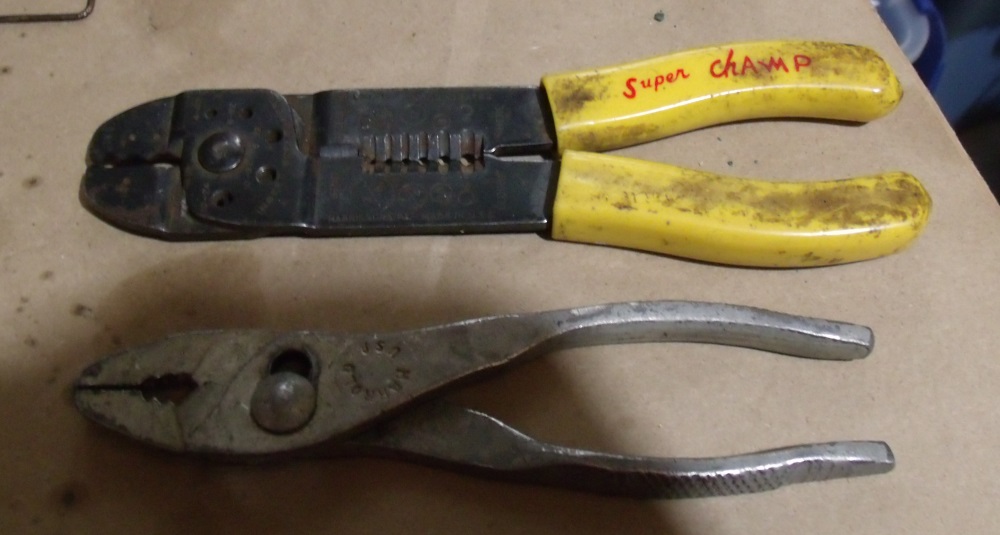
10. You can crimp the terminal with ordinary pliers, but a better result will be achieved with wire crimping pliers, like these with the yellow handle.


11. Crimp the terminal close to the end of the insulation sleeve that covers the stripped wire end.  You want the terminal to connect to the stripped wire, not the insulation.


Installing the Cord

12. Installation is the reverse of removal.  If you have space inside the controller, tie a knot in the wires to prevent them from sliding out through the exit hole.  Connect the two wires to the two terminals.  It makes no difference which wire goes to each terminal, a resistor can’t tell the difference which way current is flowing.


13. Route the wires so that they do not interfere with any moving parts and out through the exit hole, slot, or whatever is there.
14. Replace any loose parts you removed in step 4.
15. Replace the insulating pad, if your controller has one.
16. Replace the bottom cover.
17. Connect to your sewing machine and Sew!

Ed


Tuesday, October 20, 2015

Kenmore 385.1684180

Even though it has the slide plate that turns under the seam allowance, I really like my 385.17881 Kenmore because it is so smooth and quiet. 


I always consider those traits to be an indicator of the quality of the machine.  Unfortunately, when I got it, the stitch length dial was very difficult to turn and I tried to loosen things up with a heat gun, melting some teeth on the plastic gear behind the stitch length dial.  I was able to reposition the gear so that the missing teeth were  not where they would affect stitch length selection, but the dial still turns very hard and I only have stitch lengths of 10-12.  I have been looking for a replacement for that machine, hoping to find the exact model needing work so I could cannibalize parts from my current machine to rehab the new one.

I still haven't found the exact model replacement, but I saw this 385.1684180 on an online auction.


 The style lines are very similar to the 385.17881 and it has the same rotating hook and drop-in bobbin, so I bid on it, hoping it would be as smooth and quiet as the 385.17881.

When I received the 385.1684180, I saw that it appears to have been well-used, but not abused.  The light bulb was burned out and the plastic bushings that hold in both spool pins are broken.  Sears Parts Direct had the bushings in stock and they are on the way to me.  The bobbin area was very clean, making me think the machine had been well cared for, but when I opened the bottom covers, a lint ball the size of a plum fell out!  It had been cleaned from above, but never went in for a professional servicing.  There was also a lot of gummy substance on many of the surfaces underneath, including the hook gear.  I tried to clean it off with mineral oil, alcohol, and several other substances but scraping it off seemed to be the only way to remove it.

Those issues  were easy to fix but one was more difficult - it would not stitch in reverse.  Pressing the reverse button had no effect, it just kept going forward.  Tracing out the linkage from the Reverse button, I found that there are two springs and a collar that slides along the hook shaft. 


When the collar is to the right, the machine sews forward.  When the collar slides to the left, the feed dog travel is altered so the fabric feeds in reverse. 

Here's how it works:
    The spring near the Reverse button (not shown in these photos) is stronger than the spring down by the collar (in yellow circle).
    When the Reverse button is pressed, the weaker spring is allowed to slide the collar (in the red circle) to the left for Reverse.
    When the Reverse button is released, the stronger spring pulls the rod (in blue) and overrides the weaker spring and slides the collar to the right for forward sewing.

  I could feel that the collar was not moving freely and spent two days trying to free it up.  After lubing and exercising the collar and hook shaft for hours with no results, I accidentally knocked the arm from the weaker spring out of its track and found that the collar itself was actually free-moving, it was the arm from the weaker spring to the collar that was binding.  I had oiled the pivot point of that arm in the very beginning but that was not enough.  I removed the arm and spring, cleaned everything well and re-lubricated.  The Reverse button now works as advertised and the machine sews backward as well as forward.

 FORWARD

REVERSE
 
 
Ed


Thursday, September 17, 2015

Singer 20U33


  I have an industrial 20U33 that I like to sew on.  It is smooth, strong, and quiet and makes a perfect stitch.  It also has a 9mm zig zag, which I rarely take advantage of but I know it's there if I need a wide zig zag.
I have had it mounted in a power stand from a Singer 95-10 that went away years ago.


  I like the table because of its solid wood top that I intend to refinish some day and the flip-up leaf that extends the sewing surface.  Problem is, the ancient clutch motor has four wires protruding from it and I can find no documentation how to hook up the wires to make the motor operational.


  To substitute for the missing clutch motor, I installed my largest family machine motor - a 1.3 amp model from a White.


  The treadle did not allow the foot control to be positioned in a comfortable location so I wedged it under the far end of the treadle and depress the treadle to actuate the speed control, just like I would if the clutch motor were working.


  This setup allowed me to sew but there was no light.  I tried a stick-on LED light but it did not provide adequate illumination in the proper direction. 


  A tabletop Ott Lite provided illumination but I was constantly knocking it over.
To the rescue was a Singer 252


with a broken plastic gear in the upper section.


   I was able to find a replacement gear but see no way to replace it without removing the main shaft - a task I do not wish to undertake - so it is now a parts donor. 

  The first donation was the foot control, motor and attached light.  They fit perfectly on the 20U33 and I now have a machine I like to use with enough light to see what I'm doing.


Ed