Showing posts with label Janome. Show all posts

Saturday, January 09, 2016

Re-Wiring a Vintage Sewing Machine Foot Control


You bought a new foot control and want to connect it to your current cord; you bought a new cord and need to connect it to your current foot control; you bought a new cord and foot control and they came to you as separate pieces.  The following should help you get that sewing machine running.
I used a vintage Necchi foot control in my example, but you should be able to decode your foot control, once you get it opened up.

Not all vintage foot controls look the same, but all 2-wire controls operate essentially the same – electrical current flows into the control; a resistance of some sort (carbon pile, resistance wire, etc) reduces the size of that current and sends it out to the motor.

1.  Disconnect all electrical power before starting to avoid the possibility of shock or fire!!!
2. Tip the foot control over and locate the screws holding on the bottom cover. 


Many vintage Asian-made foot controls have covers that just slide off, rather than being screwed on.  I won’t discuss modern controllers because there are YouTube videos covering them.  Remove the screws or slide off the bottom cover.  Now is the time to look at any cushions surrounding the screws and obtain replacements for missing or deteriorated cushions.
3. If there is an insulation plate, remove it and set aside.  Not all foot controls have them.


WARNING:  Some controllers contain a capacitor to filter out radio noise.  They usually look like small tin cans.  Capacitors can store electricity, so do not touch the connection points to avoid shock.

4. At this point, look around for pieces that might fall out and get lost.  This controller has a spring that is not attached in any way, some button controllers have an actuating button that can fall out.  Remove any loose pieces, noting where they go so you can get them back in the right position.


5. You are now ready to disconnect the old cord, if there is one.  Just unscrew the two screws and lift the wires off.


Preparing the New Cord

6. If the cord you are installing has terminals installed, skip to step 12.
7. Since you’re still here, your cord does not have terminals installed.


  Terminals are available at Radio Shack and many hardware and home stores.  I got mine at Harbor Freight and Lowe’s.  Terminal sizes are denoted by the color of the insulation sleeve.  For the size wire used by sewing machines, pink or red insulation sleeve is appropriate.
8. Strip about ½” of insulation from the wire ends.


9. Insert the end of the wire into the terminal so that the wire insulation is well inside the terminal’s insulation sleeve and the stripped end of the wire peeks out beyond the end of the insulation sleeve.


10. You can crimp the terminal with ordinary pliers, but a better result will be achieved with wire crimping pliers, like these with the yellow handle.
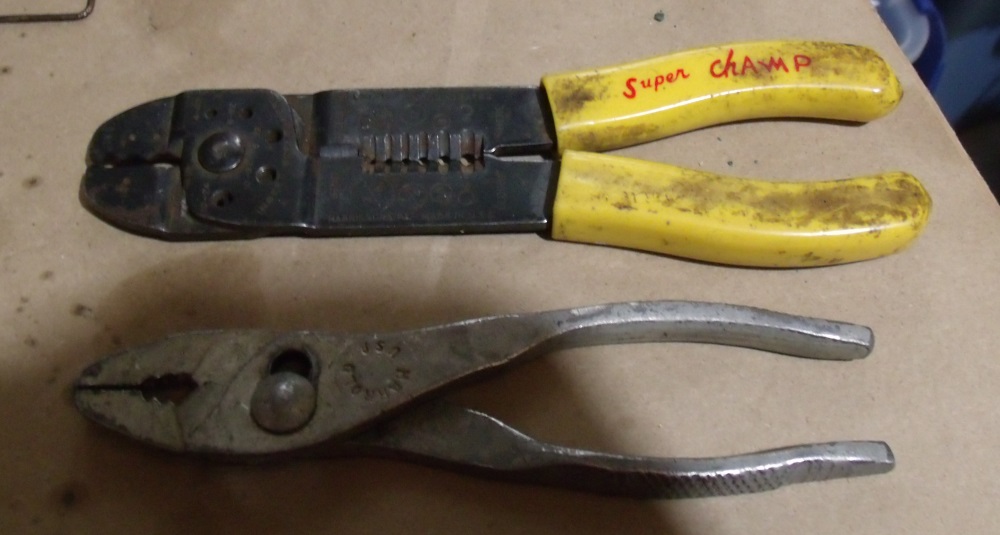


11. Crimp the terminal close to the end of the insulation sleeve that covers the stripped wire end.  You want the terminal to connect to the stripped wire, not the insulation.


Installing the Cord

12. Installation is the reverse of removal.  If you have space inside the controller, tie a knot in the wires to prevent them from sliding out through the exit hole.  Connect the two wires to the two terminals.  It makes no difference which wire goes to each terminal, a resistor can’t tell the difference which way current is flowing.


13. Route the wires so that they do not interfere with any moving parts and out through the exit hole, slot, or whatever is there.
14. Replace any loose parts you removed in step 4.
15. Replace the insulating pad, if your controller has one.
16. Replace the bottom cover.
17. Connect to your sewing machine and Sew!

Ed


Tuesday, October 20, 2015

Kenmore 385.1684180

Even though it has the slide plate that turns under the seam allowance, I really like my 385.17881 Kenmore because it is so smooth and quiet. 


I always consider those traits to be an indicator of the quality of the machine.  Unfortunately, when I got it, the stitch length dial was very difficult to turn and I tried to loosen things up with a heat gun, melting some teeth on the plastic gear behind the stitch length dial.  I was able to reposition the gear so that the missing teeth were  not where they would affect stitch length selection, but the dial still turns very hard and I only have stitch lengths of 10-12.  I have been looking for a replacement for that machine, hoping to find the exact model needing work so I could cannibalize parts from my current machine to rehab the new one.

I still haven't found the exact model replacement, but I saw this 385.1684180 on an online auction.


 The style lines are very similar to the 385.17881 and it has the same rotating hook and drop-in bobbin, so I bid on it, hoping it would be as smooth and quiet as the 385.17881.

When I received the 385.1684180, I saw that it appears to have been well-used, but not abused.  The light bulb was burned out and the plastic bushings that hold in both spool pins are broken.  Sears Parts Direct had the bushings in stock and they are on the way to me.  The bobbin area was very clean, making me think the machine had been well cared for, but when I opened the bottom covers, a lint ball the size of a plum fell out!  It had been cleaned from above, but never went in for a professional servicing.  There was also a lot of gummy substance on many of the surfaces underneath, including the hook gear.  I tried to clean it off with mineral oil, alcohol, and several other substances but scraping it off seemed to be the only way to remove it.

Those issues  were easy to fix but one was more difficult - it would not stitch in reverse.  Pressing the reverse button had no effect, it just kept going forward.  Tracing out the linkage from the Reverse button, I found that there are two springs and a collar that slides along the hook shaft. 


When the collar is to the right, the machine sews forward.  When the collar slides to the left, the feed dog travel is altered so the fabric feeds in reverse. 

Here's how it works:
    The spring near the Reverse button (not shown in these photos) is stronger than the spring down by the collar (in yellow circle).
    When the Reverse button is pressed, the weaker spring is allowed to slide the collar (in the red circle) to the left for Reverse.
    When the Reverse button is released, the stronger spring pulls the rod (in blue) and overrides the weaker spring and slides the collar to the right for forward sewing.

  I could feel that the collar was not moving freely and spent two days trying to free it up.  After lubing and exercising the collar and hook shaft for hours with no results, I accidentally knocked the arm from the weaker spring out of its track and found that the collar itself was actually free-moving, it was the arm from the weaker spring to the collar that was binding.  I had oiled the pivot point of that arm in the very beginning but that was not enough.  I removed the arm and spring, cleaned everything well and re-lubricated.  The Reverse button now works as advertised and the machine sews backward as well as forward.

 FORWARD

REVERSE
 
 
Ed


Saturday, May 10, 2014

Singer 29-4

We had a community yard sale last weekend and I made a landfill contribution on Friday.  I now have a clear path to my 29-4 Shoe Patcher.


  I picked this machine up at a local auction for $25 but would have paid $50 for someone to load it into my minivan for me - It is a MONSTER!  I was surprised to get the machine that sells in the $400 range on Ebay for such a low price, especially because it is treadle-operated and there were several Amish bidders in the house.
  The decals are not complete, but more prevalent than many because these machines were used in shoe factories and saw a lot of use.


  I took the machine home and put it in the storage shed, intending to get to it later - I never did.  When we moved to our present house four years ago, I put it in the garage and piled lawn furniture, bicycles, yard working equipment, and a table saw in front of it and have never dug it out to tinker with it.

  I hope it works because Kathie bought a carrying case for her Janome Jem


and one end of the zipper did not get caught in the sewing process.


I tried to repair it on a flatbed machine but just can't get the fabric to lay down flat enough to sew it.  I have tacked it by hand for now but would like to effect a permanent repair by machine and the 29 is the only machine I have that might do the job. It has a narrow free arm and the feeding foot rotates to feed the fabric in any direction.


Ed's Vintage Sewing Machine Shop


Tuesday, October 01, 2013

Janome Jem 639 and My New Favorite Cleaning Aid

  On my weekly stroll through the local thrift shop, I spotted a sweet little Janome Jem just waiting for me to take it home.  It appeared to be in good condition, the foot control, presser foot, and bobbin case were present so I picked it up in hopes that one of the local quilters would be willing to give me a little more than I paid for a lightweight machine to carry to sew-ins and classes.


  When I got it home, I found it was not just in good condition, it looks like it has never been used!  The sticker on top showing how to wind a bobbin was not even smudged.


  It needed no repairs or adjustments, it sews like right out of the box! The package of three needles that came with the machine is unopened.  The only attachment that came with it was a buttonhole foot, there probably should have been a zipper foot, at least.

  The one detracting feature was the price - written in magic marker on the plastic case.  In the past, I have used headlight lens restorer to remove magic marker from plastic but the headlight lens restorer was downstairs and I was upstairs, so I grabbed something else to try, a magic eraser.


  I had never used one of these but picked one up at the Dollar Store to clean our fiberglass shower stall.  It worked fine there, so I have been trying it out on other surfaces - tile grout, vinyl flooring, metal sewing machines - all with excellent results.  I was hesitant to use it on this shiny plastic machine, fearing it might leave scratches or leave a shadow of the Sharpie price mark.  It cleaned off the mark completely and left nary a scratch in the plastic.


 Now a word about Janome Customer Service. I emailed them asking for a copy of the 639 instruction manual.  Within 6 hours, I had a return email with a pdf attachment titled "639.pdf" but when I opened the file, it was for a 693, not a 639.  I emailed them again and within 6 hours had another return email with the proper instruction manual.  Thank you, Janome Customer Service.